
How to delete Meter reading?
After logged in as admin having meter reading (access rights), you can delete meter reading as per your needs using the following steps
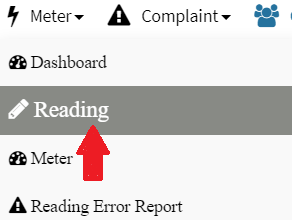
Step 1: Go to Main Menu (Meter), Select “Reading” option from drop down sub menu
Step 2: Select unit no., meter type and click on “Search” to display all meter reading of a single unit. In case no meter Reading exist against unit then you will get “No Reading Found” message.

Step 3: Click on “Delete” button .

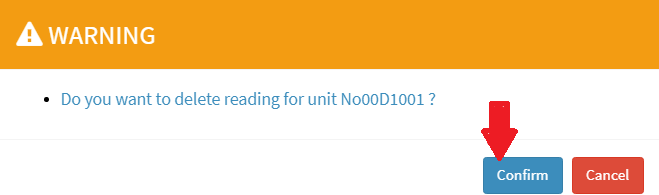
Step 5: You will get warning message to delete the reading, Click on “Confirm” button
 Admin can delete last meter reading only if bill is not generated against this reading
Ready to Transform Your Facility Management?
See how Factech automates maintenance, assets, and compliance in one intelligent platform.
Let's Talk
Have questions about our AI-powered solutions? Our team is here to help you digitize your facility operations.
Ready to Transform Your Facility Management?
See how Factech automates maintenance, assets, and compliance in one intelligent platform.
Let's Talk
Have questions about our AI-powered solutions? Our team is here to help you digitize your facility operations.


Leave a Comment