
How to Cancel or delete bills?
After login with a role having Bill delete permission, You can cancel invoice as per requirements using the following steps:
- In main menu go Bill and select search Bill
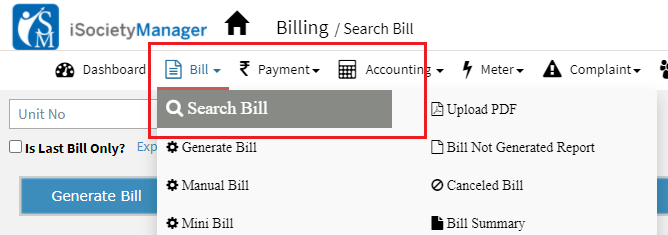
- Select unit and bill plan click on search to display all bills of a single unit.
- Click on Cancel bill.

- Add remarks and Click on Submit
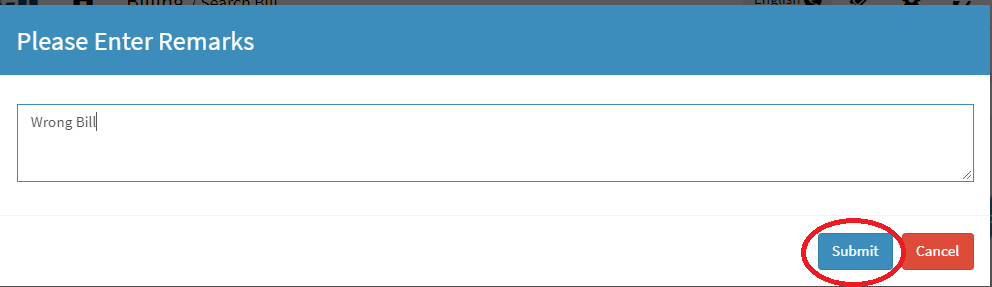
Last invoice can be cancelled for any bill plan, Once you canceled the bill/invoice you can check canceled invoice details using the following steps:
- In main menu go Bill and select Canceled Bill
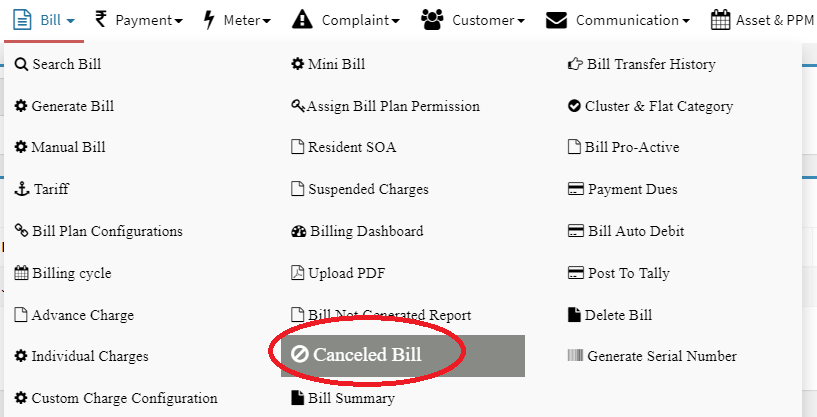
- Select bill month and All
- Click on Search icon, All cancelled invoice details will be displayed for selected bill month

Ready to Transform Your Facility Management?
See how Factech automates maintenance, assets, and compliance in one intelligent platform.
Let's Talk
Have questions about our AI-powered solutions? Our team is here to help you digitize your facility operations.
Ready to Transform Your Facility Management?
See how Factech automates maintenance, assets, and compliance in one intelligent platform.
Let's Talk
Have questions about our AI-powered solutions? Our team is here to help you digitize your facility operations.


Leave a Comment