
How to Add/Import Meter?
Logged in as admin having Meter permission (access rights), you can add/import Meter details as per your needs.
Following are the steps to add Meter (online meter reading) for individual unit
Step 1: Go to Main Menu (Meter), Select “Meter” option from drop down menu.
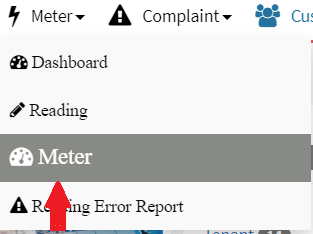
Step 2: Click on Add “Meter”

Enter all required fields, in below form, to complete the add meter process. Following are the fields to enter data.
Step 3: Click on “Submit” button after entering data, you will get “Success” message.
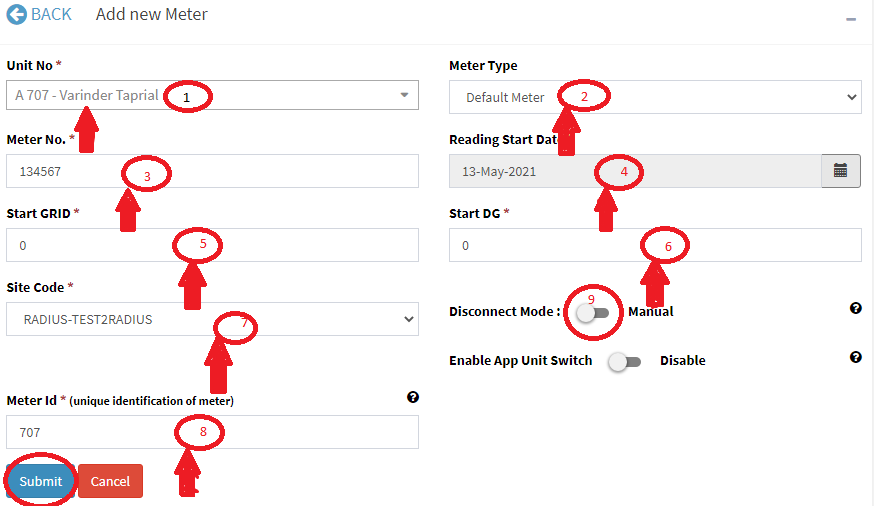
1. Unit No: Select unit number from drop down.
2. Mete Type: Select meter type as per your needs, it could be AHU, Meter2 etc.
3. Meter No: Enter meter number, it is unique for your site.
4. Reading Start Date: It is Meter installed date.
5. Start GRID: The start grid reading of new installed meter, it could be any positive value including zero.
6. Start DG: The start DG reading of new installed meter, it could be any positive value including zero.
Following field will be shown in case of online meter
7. Site Code: This is unique for metering server/metering vendor to sync the online reading.
8. Meter ID: This is unique identification of unit in metering server/metering vendor system, it could be customer ID, meter No, Meter ID etc., depending on metering company.
9. Disconnect Mode: Meter is auto disconnect if meter balance reached the define threshold if disconnect mode is enabled.
Following are the steps to import Meter details in bulk
Step 1: Go to Main Menu (Meter), Select “Meter” option from drop down menu

Step 2: Click on “Import Meter” and Download Meter “template” to upload the meter data
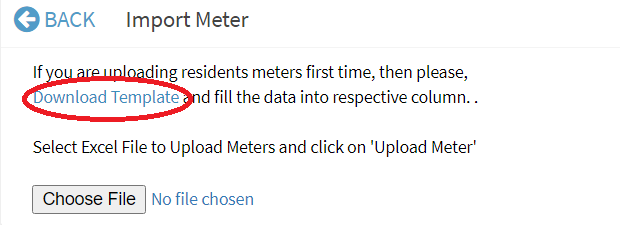
Step 3: Fill Meter details and save excel file

Step 4: Choose excel file and click on “Upload Meter” button
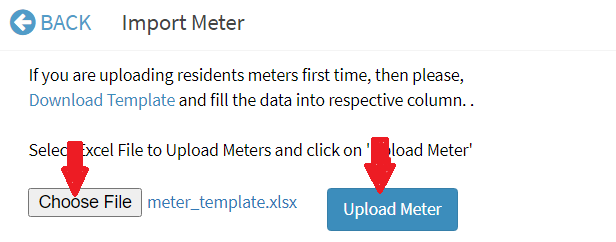
Step 5: Go to Main Menu (Meter) , Select “Meter” option then search unit from the Drop down and Select Meter Type, you will get Meter details.

You can update existing meter details once meter is added.
Ready to Transform Your Facility Management?
See how Factech automates maintenance, assets, and compliance in one intelligent platform.
Let's Talk
Have questions about our AI-powered solutions? Our team is here to help you digitize your facility operations.
Ready to Transform Your Facility Management?
See how Factech automates maintenance, assets, and compliance in one intelligent platform.
Let's Talk
Have questions about our AI-powered solutions? Our team is here to help you digitize your facility operations.


Leave a Comment