

How to update meter reset change through Kaizen(Asset & PPM) ?
Step 1.
Log in through factech.co.in
Step 2.
Click on Asset & PPM ( refer screenshot)

Step 3.
Select the meter which you already added as meter for reading purpose. Then click on Log option. (refer screenshot)

After clicking on Log option, click on reading.
Step 4.
Now click on the meter update option ( refer screenshot)
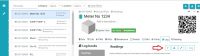
Step 5.
Fill the details and then click on change meter.
Your Meter Reset details has been updated successfully!!
Ready to Transform Your Facility Management?
See how Factech automates maintenance, assets, and compliance in one intelligent platform.
Let's Talk
Have questions about our AI-powered solutions? Our team is here to help you digitize your facility operations.
Ready to Transform Your Facility Management?
See how Factech automates maintenance, assets, and compliance in one intelligent platform.
Let's Talk
Have questions about our AI-powered solutions? Our team is here to help you digitize your facility operations.


Leave a Comment