
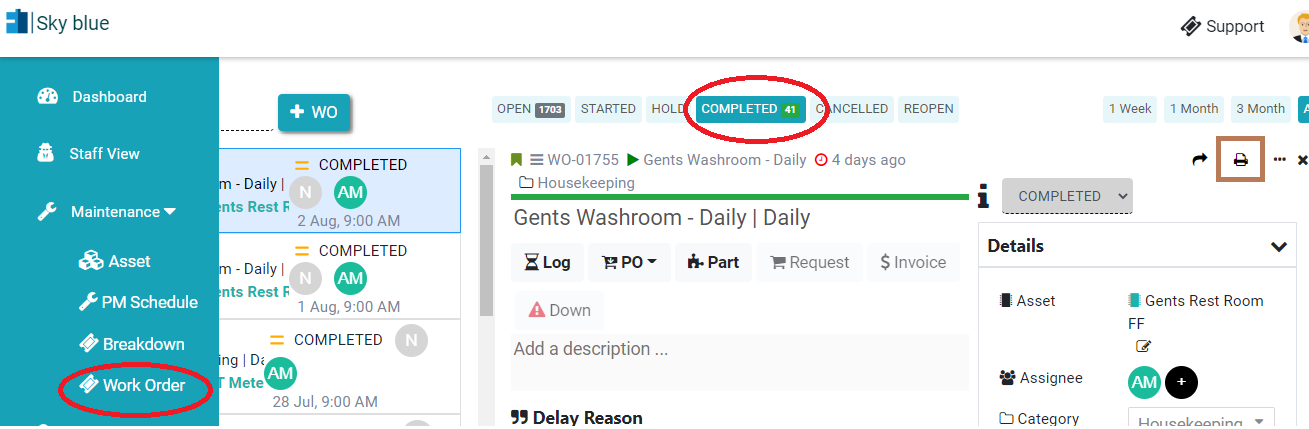
How to get pdf / print of Completed Work Order?
In Kaizen CAFM, if you have permission, you can print or download pdf of the work order.
You can download the Work Order PDF individually by following these steps:
Steps to Download Work Order PDF
- Log in to Factech with your admin login.
- Go to Asset → PPM.
- Click on Work Order.
- Click on the Completed tab at the top.
- Select the Work Order for which you want to download the PDF.
- Click on Generate PDF.
- Click on Preview/Download PDF to view or download the Work Order PDF.

Note: You can download the PDF separately for each completed Work Order.
Ready to Transform Your Facility Management?
See how Factech automates maintenance, assets, and compliance in one intelligent platform.
Let's Talk
Have questions about our AI-powered solutions? Our team is here to help you digitize your facility operations.
Ready to Transform Your Facility Management?
See how Factech automates maintenance, assets, and compliance in one intelligent platform.
Let's Talk
Have questions about our AI-powered solutions? Our team is here to help you digitize your facility operations.


Leave a Comment