How to import bulk Maintenance Schedules
Prerequisite Get Ready with the excel for your Maintenance schedule (one in a row). The same can be used for importing housekeeping schedules . Example as below… Click here to download Asset…
 Simplifying Facilities...
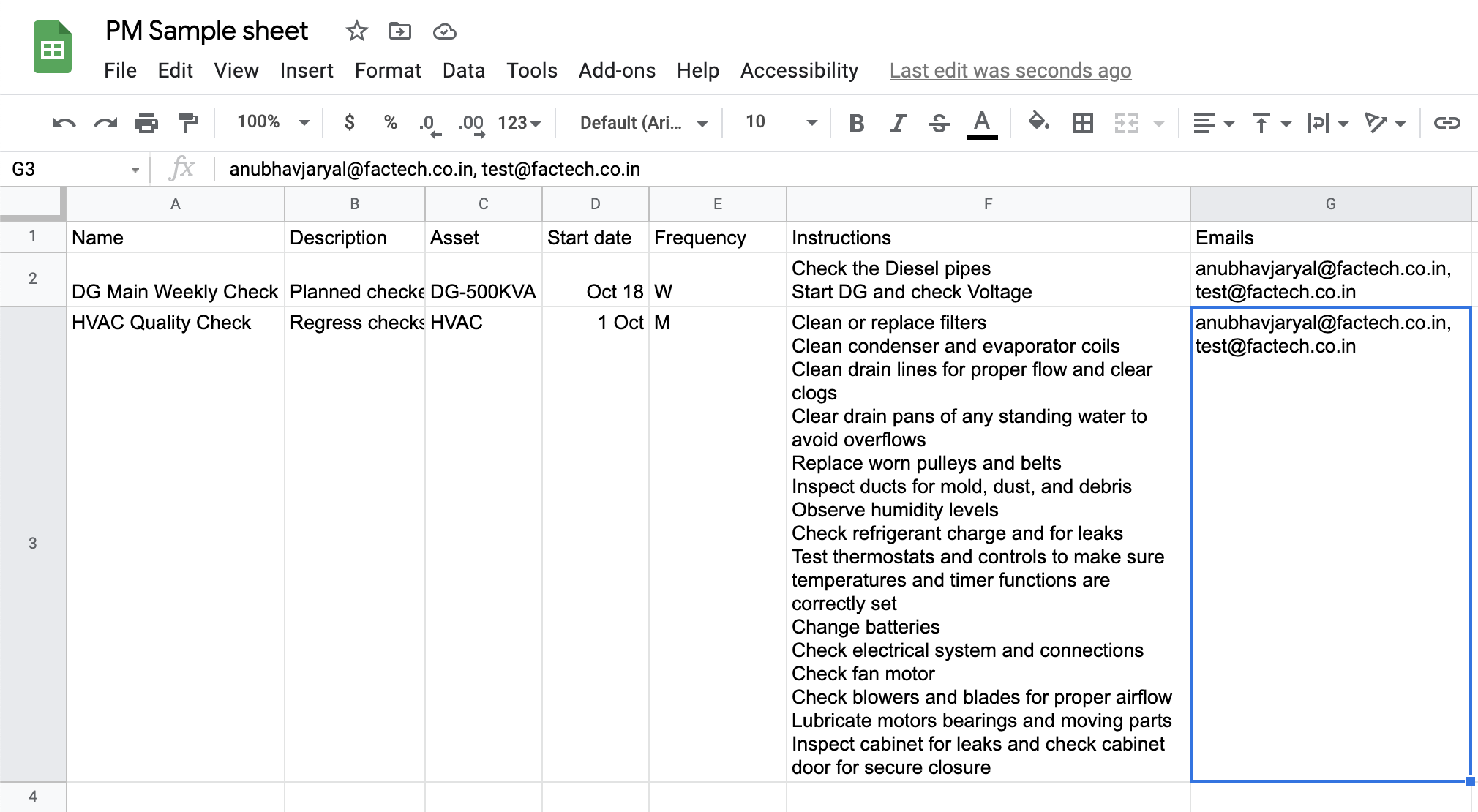
Prerequisite Get Ready with the excel for your Maintenance schedule (one in a row). The same can be used for importing housekeeping schedules . Example as below… Click here to download Asset…

Kaizen system is used to simplify and automate Facility Operations for Hard FM or Engineering Services Soft FM including housekeeping services Kaizen reports can be categorized in below: Work Order / Maintenance…
You can add all instructions or checklist points by simply copying the steps from excel or any other doc and pasting in the Text area. Note:- If you are not seeing the…
Checklists or instructions are a key part of any Work Order. Checklists help us stay more organized by assuring we don’t skip any steps in a process. They are easy to use…
Work orders can be manually generated through a work request submitted by a staff member, client or automatically generated through Asset Performance Monitoring or Preventive Maintenance(PM). Kaizen helps you create work orders…