How to Configure Escalation Matrix for Unassigned Complaints in FacTech
Automatically Escalate Complaints Until They Are Assigned
We are pleased to introduce the Unassigned Complaint Escalation Matrix in FacTech CAFM, which helps organizations ensure that no complaint remains unattended due to a delay in staff assignment.
With this feature, administrators can configure an escalation matrix specifically for complaints that have not yet been assigned to any staff member.
If a complaint remains unassigned for the configured duration, the system automatically escalates it to the designated user or role through the configured notification mechanism.
This helps management teams monitor pending complaints and take timely action to ensure that every complaint gets assigned to the appropriate staff.
What is an Unassigned Complaint Escalation Matrix?
An Unassigned Complaint Escalation Matrix is a notification-based escalation mechanism that works when a complaint has been raised but no staff member has been assigned to it.
For example:
Suppose a complaint is raised, but it remains unassigned for 30 minutes.
You can configure the system to notify a designated manager or role if the complaint is still unassigned after those 30 minutes.
You can also configure multiple escalation levels with different notification recipients and time intervals.
How to Configure the Escalation Matrix for Unassigned Complaints?
Follow these simple steps to configure the escalation matrix.
Step 1: Navigate to Complaint Escalation
- Login to the FacTech CAFM Portal as an Admin.
- Navigate to Complaints.
- Open Complaint Escalation.
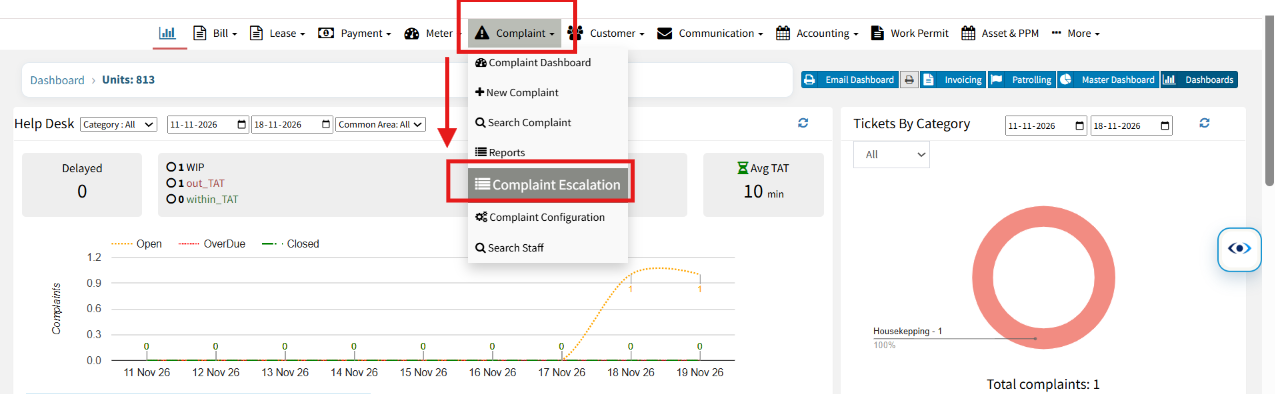
You will now be redirected to the Complaint Escalation configuration page.
Step 2: Select the Escalation Stage
On the Complaint Escalation page:
- Locate the Escalation Stage option.
- Select Not Assigned.
What does Not Assigned mean?
Not Assigned is an escalation stage that applies to complaints where no staff member has been assigned yet.
The escalation matrix will work as long as the complaint remains unassigned.
Step 3: Configure the Escalation Matrix
After selecting the Not Assigned stage, configure the following details:
1. Category
Select the complaint category for which you want to configure the escalation matrix.
2. Sub-Category
Select the relevant complaint sub-category.
3. Escalation Level
Select the required escalation level.
4. Notify By
Select how the notification recipient should be identified.
You can choose:
- User: Notify a specific individual.
- Role: Notify a person based on their assigned role.
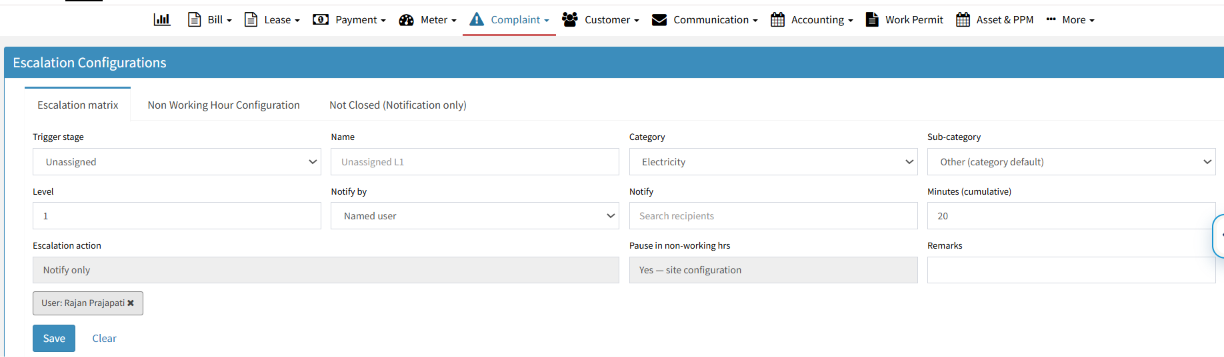
5. Notify Person / Role
Based on the Notify By selection, choose the appropriate user or role who should receive the escalation notification.
6. Time (Minutes)
Enter the time interval in minutes after which the complaint should be escalated if it is still unassigned.
For example:
If you configure 30 minutes, the system will trigger the escalation notification when the complaint remains unassigned for the configured duration.
Once all the required details have been entered, click Save.
Your Unassigned Complaint Escalation Matrix is now configured.
Configure Escalation for Multiple Categories
FacTech also allows you to configure escalation rules for different complaint categories and sub-categories.
You can configure separate escalation matrices when different categories require different:
- Notification recipients
- Escalation levels
- Time intervals
- User or role assignments
Alternatively, if the same escalation rules apply to all complaint categories, you can select All Categories and configure a common escalation matrix.
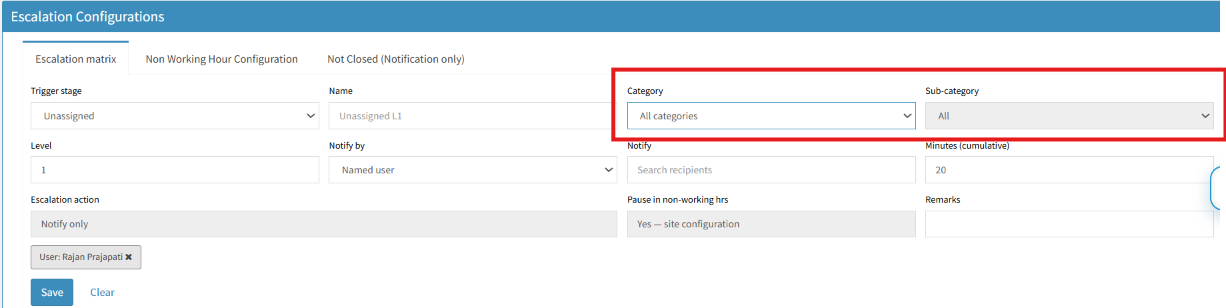
This makes escalation management easier and reduces repetitive configuration.
How Does the Unassigned Complaint Escalation Work?
Once the escalation matrix is configured, the system monitors complaints that have not been assigned to any staff member.
For example:
- A complaint is raised in FacTech.
- No staff member is assigned to the complaint.
- The configured time interval is reached.
- The system triggers an escalation notification to the configured user or role.
- If the complaint continues to remain unassigned, further escalation levels can be configured to notify the next designated recipients.
This ensures that pending complaints receive management attention until they are assigned.
Key Benefits
✅ Automatic escalation of unassigned complaints
✅ Reduced delays in complaint assignment
✅ Multiple escalation levels
✅ Category-wise and sub-category-wise configuration
✅ Notifications to specific users or roles
✅ Configurable escalation time intervals
✅ Common escalation configuration for all categories
✅ Better complaint monitoring and accountability
✅ Ensures timely assignment of complaints
Frequently Asked Questions (FAQs)
Q1. What is an Unassigned Complaint Escalation Matrix?
It is a configuration that automatically escalates complaints when they remain unassigned for the configured time interval.
Q2. When does this escalation matrix work?
It works when a complaint has been raised but no staff member has been assigned to it.
Q3. Where can I configure this feature?
Navigate to:
Complaints → Complaint Escalation → Escalation Stage → Not Assigned
Q4. Can I configure different escalation rules for different complaint categories?
Yes. You can configure different escalation rules for different categories and sub-categories based on notification recipients and time intervals.
Q5. What is the difference between Notify By User and Notify By Role?
- User: Sends the escalation notification to a specific individual.
- Role: Sends the escalation notification based on the selected role.
Q6. Can I configure multiple escalation levels?
Yes. You can configure multiple escalation levels with different notification recipients and time intervals.
Q7. Can I configure the same escalation matrix for all complaint categories?
Yes. You can select All Categories when the same escalation rules are applicable across categories.
Q8. What happens if a complaint remains unassigned?
The system triggers the configured escalation notifications according to the defined escalation levels and time intervals until the complaint is assigned.
Conclusion
The Unassigned Complaint Escalation Matrix in FacTech CAFM ensures that complaints do not remain unattended due to delays in staff assignment.
With configurable escalation levels, category-wise rules, notification recipients, and time intervals, organizations can improve complaint assignment efficiency and maintain better control over their complaint management process.
No complaint should remain unnoticed. Ensure timely assignment with FacTech CAFM.
Ready to Transform Your Facility Management?
See how Factech automates maintenance, assets, and compliance in one intelligent platform.
Let's Talk
Have questions about our AI-powered solutions? Our team is here to help you digitize your facility operations.
Ready to Transform Your Facility Management?
See how Factech automates maintenance, assets, and compliance in one intelligent platform.
Let's Talk
Have questions about our AI-powered solutions? Our team is here to help you digitize your facility operations.