
How to update parking slot and their amount for Maintenance Bill?
There are 2 steps to show parking charge and their slot number in Maintenance bill
Following are the steps to Add parking number/slot for a unit.
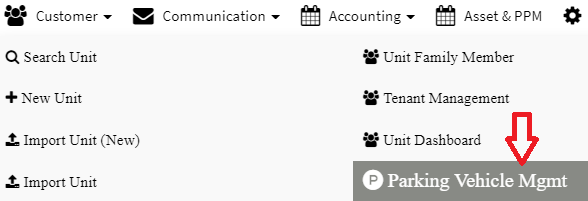
Step 1: Go to Main Menu (Customer), Select “Parking Vehicle Mgmt” option from drop down sub menu
Step 2: Click on Add (+P) parking

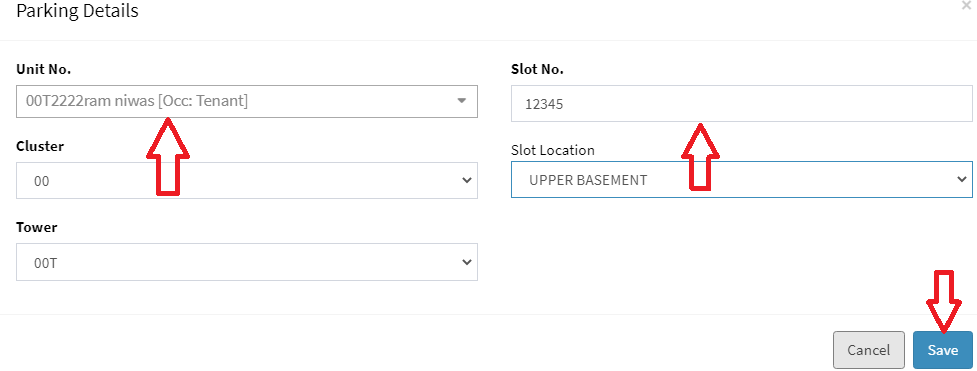
Step 3: Select unit number and enter slot/parking number and click on “Save” button
Following are the steps to update parking charge amount for a unit.
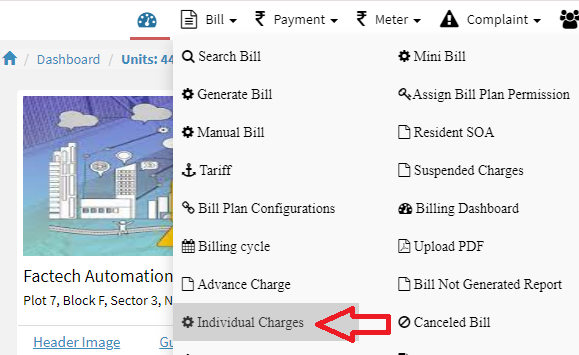
Step 1: Go to Main Menu (Meter), Select “Individual Charges” option from drop down sub menu
Step 2: Select your charge, unit no and click on “Search” button. There are two check boxes for selection of active/inactive units.
 Step 3: Click on “Edit” button against any unit. Select active as “Yes”. Enter your value and click on “Save” button. You will receive a success alert message.

Note: You can refer below link to update individual charge in bulk through excel file import
https://factech.ai/blog/ufaqs/how-to-add-import-individual-charge-amount/
After update parking charge amount, you can verify parking charge amount in bill generation.
Ready to Transform Your Facility Management?
See how Factech automates maintenance, assets, and compliance in one intelligent platform.
Let's Talk
Have questions about our AI-powered solutions? Our team is here to help you digitize your facility operations.
Ready to Transform Your Facility Management?
See how Factech automates maintenance, assets, and compliance in one intelligent platform.
Let's Talk
Have questions about our AI-powered solutions? Our team is here to help you digitize your facility operations.


Leave a Comment