
How to enable Auto Assign Feature in Complaint Management?
What is Auto Assignment of Complaint?
When a complaint is raised, if the complaint get automatically assigned to the technician ( ground staff- who is expected to work o the complaint) is Auto Assignment. Assignment of the complaint happen without any manual intervention.
What are options in Auto Assignment?
User can choose any of the 2 strategies for auto assign:
- Technician Login: Complaint to be assigned to any of the staff who are currently logged into the system – through mobile App
- Attendance Based: Complaint to be assigned to any of the staff who are present today. This requires – attendance integration or Manager can mark staffs who are not present currently. This is default strategy.
To select the appropriate strategy:
Go to Setting-> Site Setting -> Complaint -> Auto Assign
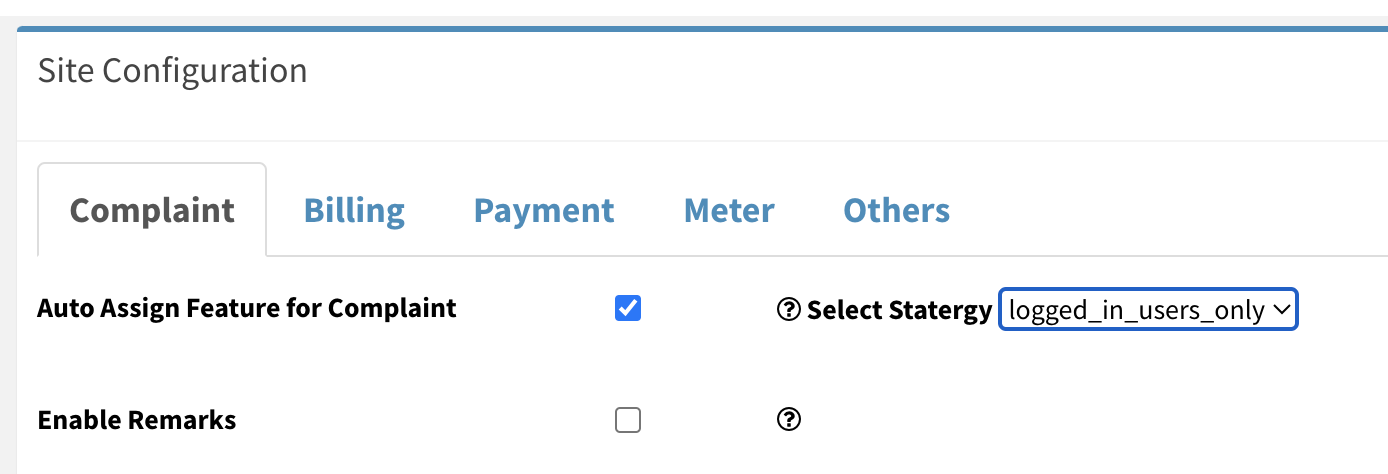
- logged In User : Select this if you want to assign complaint to logged in technicians only
Ready to Transform Your Facility Management?
See how Factech automates maintenance, assets, and compliance in one intelligent platform.
Let's Talk
Have questions about our AI-powered solutions? Our team is here to help you digitize your facility operations.
Ready to Transform Your Facility Management?
See how Factech automates maintenance, assets, and compliance in one intelligent platform.
Let's Talk
Have questions about our AI-powered solutions? Our team is here to help you digitize your facility operations.


