
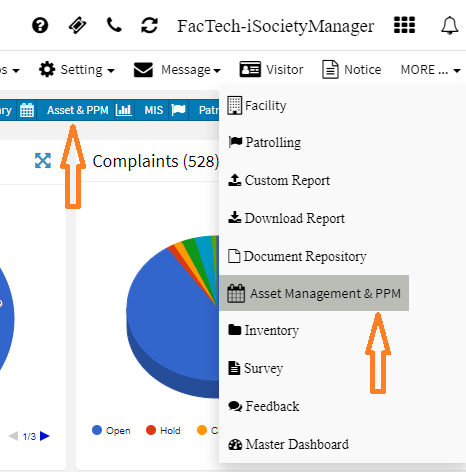
How to add assets in Kaizen?
To add a new asset:
- Go to Dashboard -> Asset & PPM or More -> Asset & PPM

- Asset Management Dashboard with all menu options on the left side will be displayed. Click on Asset Icon to go to Asset UI.

- Click on Add Asset at Top right in the Asset UI. You’ll get the below options:
- Select whether it’s Asset or Part
- Enable Allow Reading – if you want to capture the reading of that Asset like in case of DG.
- Select Category of Asset like – DG, Lift, etc. You can add a new category, if not available.
- Select the Location of the Asset. You can add a new location from this UI.
- Generate QR Code – Enable this option if you want to generate the QR code while adding the Asset detail.
- By default – Name, Make, Model, Cost, Purchase Date properties are shown. You can click on Show More to view more properties.

https://blog.isocietymanager.com/ufaqs/how-to-edit-an-asset-detail/
https://blog.isocietymanager.com/ufaqs/how-to-import-assets/
Ready to Transform Your Facility Management?
See how Factech automates maintenance, assets, and compliance in one intelligent platform.
Let's Talk
Have questions about our AI-powered solutions? Our team is here to help you digitize your facility operations.
Ready to Transform Your Facility Management?
See how Factech automates maintenance, assets, and compliance in one intelligent platform.
Let's Talk
Have questions about our AI-powered solutions? Our team is here to help you digitize your facility operations.


Leave a Comment