FAQ Category: Asset Management

How to assign Work Order/ Schedules to Team in Kaizen CAFM

Many times we need to assign Job / Work to multiple staffs. In Kaizen CAFM you can achieve this by: Creating Team and mapping Staff to the team Assign PM/ Work Orders / Job to Team You have flexibility to assign WO/ PM/ Jobs to Single Staff Multiple Staff Team Team + Staff    

Read more

How to update meter reset change through Kaizen(Asset & PPM) ?

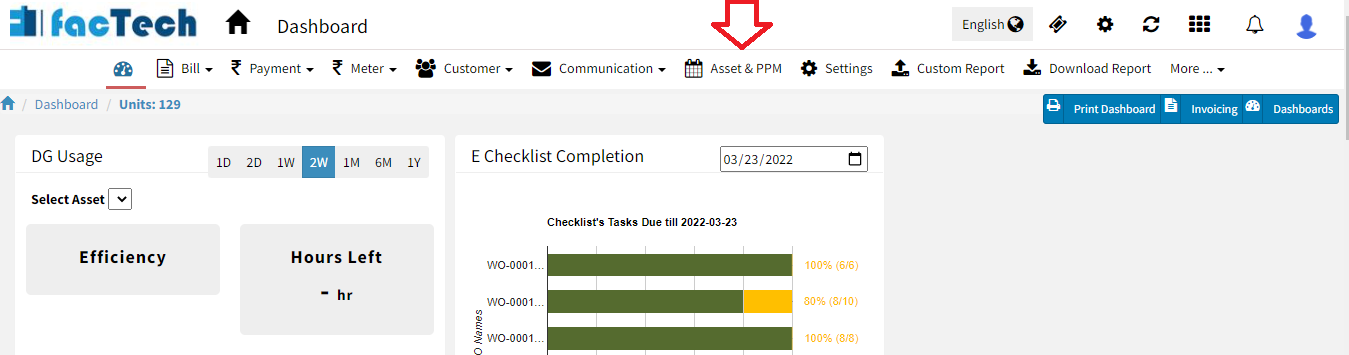
Step 1. Log in through factech.co.in Step 2. Click on Asset & PPM ( refer screenshot) Step 3. Select the meter which you already added as meter for reading purpose. Then click on Log option. (refer screenshot) After clicking on Log option, click on reading. Step 4. Now click on the meter update option (

Read more

How to download category wise PM schedule report in bulk?

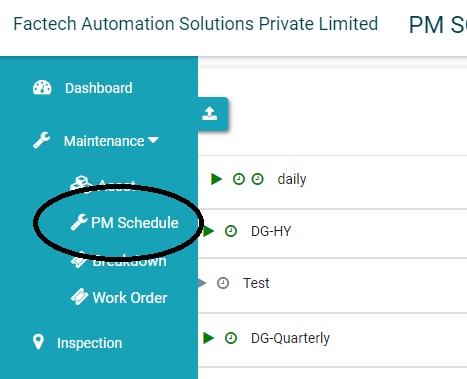
Step 1. Log in through factech.co.in Step 2. Click on Asset & PPM tab.(refer screenshot). Step 3. Then click on PM Schedule under the maintenance option. (refer to screenshot) Step 4. Click on the export PM option. (refer to screenshot) Step 5. Select the category and date range. (refer to screenshot) Step 6. After selection,

Read more

Preventive Maintenance Schedule details in CAFM CMMS

How to assign Work to Staff in KaiZen?

Admin with permissions can assign – schedule or the specific work order to the designated staff. A prerequisite for this is staff should be added to the System. Refer How to add Staff Assigning schedule to Staff Admin can assign the schedule to one or more staff. All future Work Orders created from that schedule

Read more

Hello ! If You Are Ready To Take Your Facility Management To Next Level...