
How to get started with Inventory Management?
Knowing what you have, what is in your warehouse, and how to manage the supply chain is very critical for effective management of your facility and maintenance operations.
From a project or society perspective, inventory includes consumable items like Diesel, Spares, Tubelights, Batteries, stationery, etc.
Template for Data Inputs : – https://bit.ly/3eJkNbo
Inventory Management System helps in
- What is the current stock of any item?
- Which items are below the threshold so that the new order can be placed?
- Tracking of items – Purchase, Consumption
- Alert when an item is below the threshold.
- Enable storekeeper to identify items from the lot, which warranty is going to expire first.
To start using Inventory in Factech, you need to enable permission for the roles you want to give access of Inventory Management.
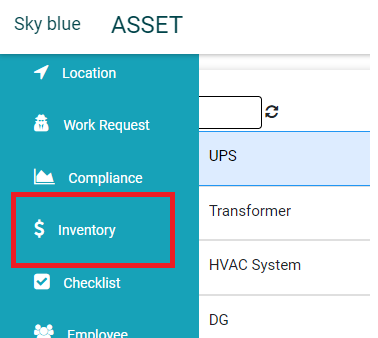
- To open the inventory Inventory, After Login, Go to Asset PPM -> Inventory
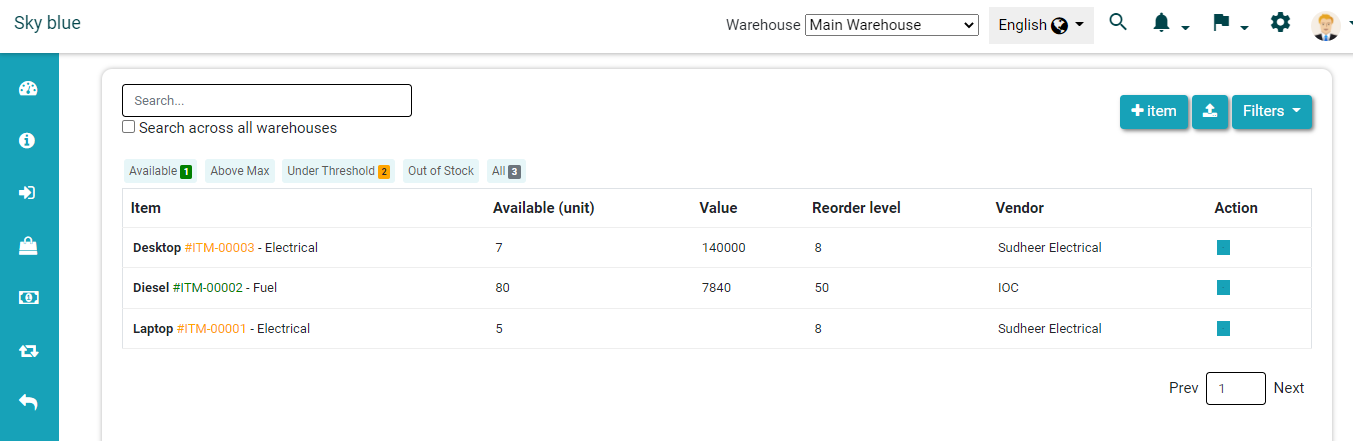
- You will see the inventory home page
Ready to Transform Your Facility Management?
See how Factech automates maintenance, assets, and compliance in one intelligent platform.
Let's Talk
Have questions about our AI-powered solutions? Our team is here to help you digitize your facility operations.
Ready to Transform Your Facility Management?
See how Factech automates maintenance, assets, and compliance in one intelligent platform.
Let's Talk
Have questions about our AI-powered solutions? Our team is here to help you digitize your facility operations.


Leave a Comment