
How to cancel Payment?
We humans do make mistakes. Suppose if mistakenly we add wrong payment entry then in iSocietyManager we can cancel those wrong payment, for that we have to follow the given steps.
- First we have to search the payment which we want to cancel. To know how to search payment click on : How to search payment for unit?
- Once you find the payment records which you want to cancel, click on the 3 dot/burger menu to the respective payment under Action column.
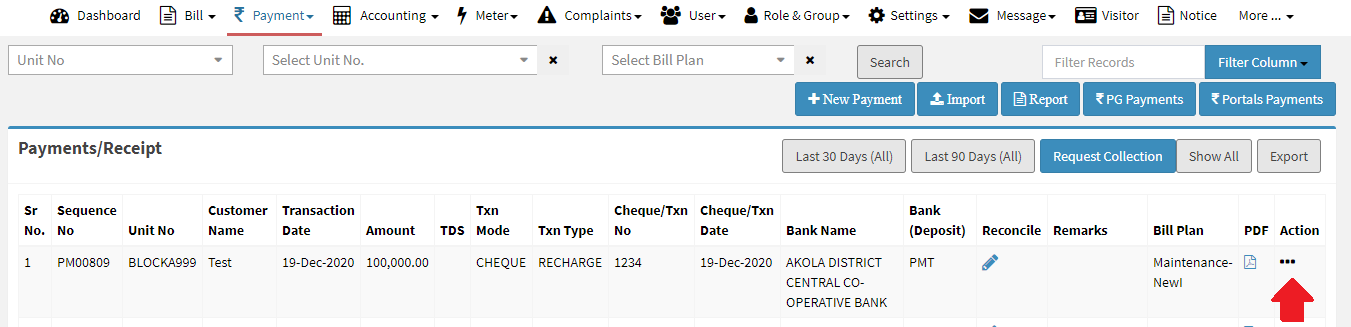
- Now click on Cancel Payment.

- Once you click on Cancel Payment then pop-up window will appear, in which you have to provide Remarks and click on Submit button.
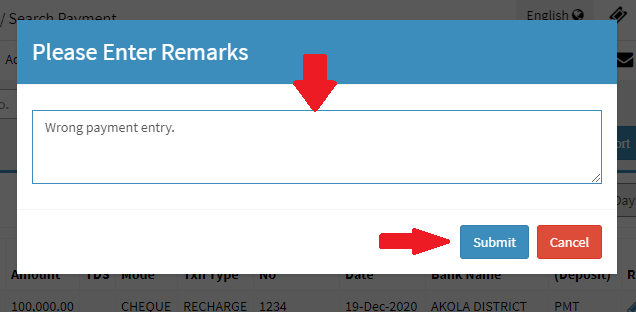

Hence then payment will be cancelled.
Ready to Transform Your Facility Management?
See how Factech automates maintenance, assets, and compliance in one intelligent platform.
Let's Talk
Have questions about our AI-powered solutions? Our team is here to help you digitize your facility operations.
Ready to Transform Your Facility Management?
See how Factech automates maintenance, assets, and compliance in one intelligent platform.
Let's Talk
Have questions about our AI-powered solutions? Our team is here to help you digitize your facility operations.


Leave a Comment