Register and Access Staff, Admin, & Resident from Any Country
We are pleased to introduce a new enhancement in FacTech CAFM that allows staff members, admin & residents to be registered and accessed using their country code along with their mobile number.
With this update, organizations can now add staff, admin & residents from different countries using their respective international country codes, making staff, admin & resident registration and mobile application login more convenient for global operations.
What is Country Code Support?
Country Code Support allows administrators to enter a staff, admin or resident’s mobile number along with the appropriate international country code while creating the staff profile.
For example:
+91 9876543210 – India
The configured mobile number can then be used by the staff, admin or resident member to register and log in to the FacTech Application.
Note: While login to the FacTech application you need to avoid to add the country code.
For example: As a staff i have registered with this number +919625807599, then i need to use the number only without country code(9625807599) to login in the tech app.
How to Add a Staff with a Country Code?
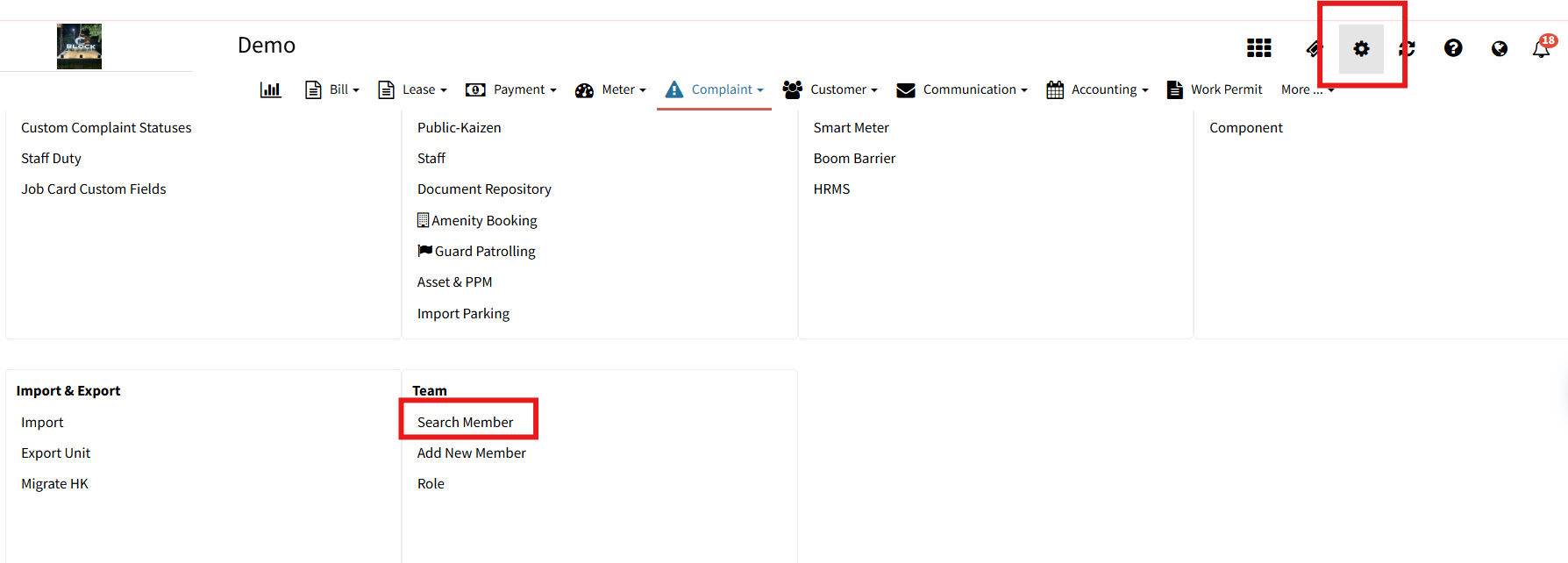
Step 1: Open Settings
Login to the FacTech CAFM Portal as an Admin.
Click on Settings.
Step 2: Open the Staff List
On the Settings page, scroll down.
Navigate to Search Member.
Click on Staff to view the complete staff list.
Step 3: Create a New Staff
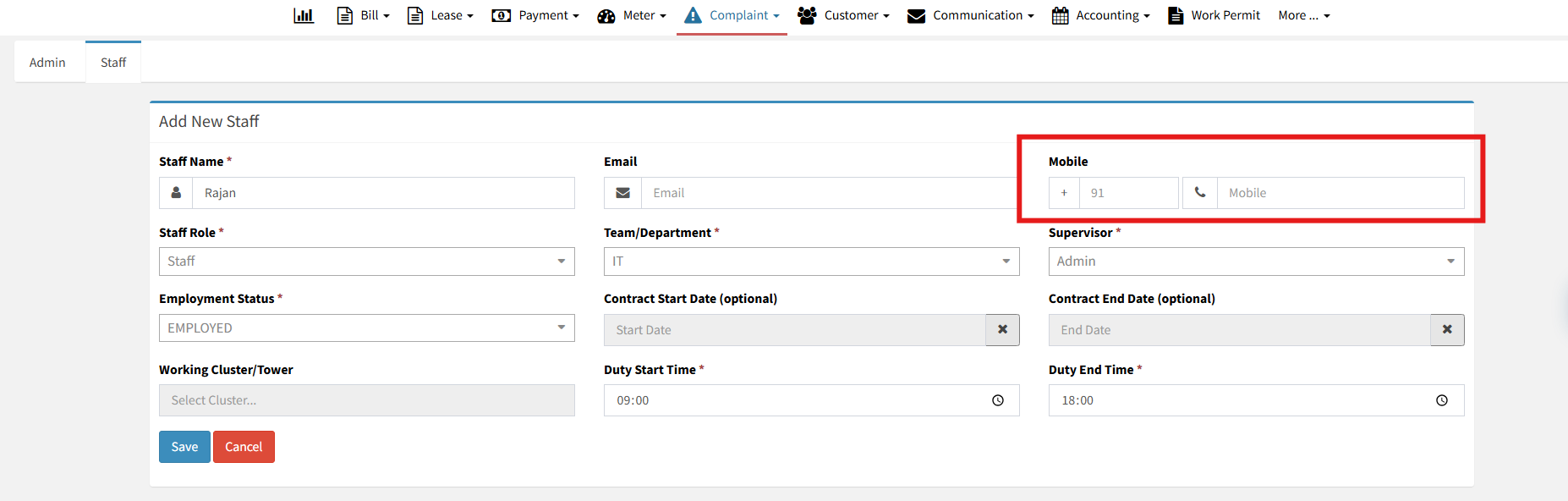
Click on “+ New Staff”.
Enter the required staff details, such as:
Staff Name
Staff Role
Technician Type
Supervisor Details
Mobile Number
Enter the Mobile Number with Country Code
While entering the mobile number, first select or enter the appropriate Country Code, followed by the staff member’s mobile number.
For example:
Country Code: +91 Mobile Number: 9876543210
The system will save the complete number with the selected country code.
After entering all required details, click Save.
Similarly, we can add country codes to Admin and Resident data as well.
Map the Staff with the Appropriate Team
After successfully creating the staff profile, the staff member should be mapped with the relevant Team.
Team mapping ensures that the staff member can receive and view the tasks assigned to their respective team through the FacTech application.
Key Benefits
✅ Support for international country codes
✅ Easy staff registration for global teams
✅ Staff can use their international mobile numbers for app access
✅ Simplified staff management
✅ Better support for multi-country operations
✅ Team-based task visibility after staff mapping
Frequently Asked Questions (FAQs)
Q1. Can I add staff, admin or residents from other countries?
Yes. FacTech now supports mobile numbers with international country codes, allowing staff, admin or resident from different countries to be registered.
Q2. Where can I add the country code?
The country code can be entered while creating a new staff profile under the Mobile Number field.
Q3. Can staff members use this number to log in to the mobile application?
Yes. The registered mobile number, including its country code, can be used for staff application registration and login.
Q4. What staff information can be configured?
You can configure details such as Staff Name, Staff Role, Technician Type, Supervisor Details, and Mobile Number.
Q5. Is team mapping required after creating the staff?
The staff member should be mapped with the appropriate team so that they can view and receive the tasks assigned to that team.
Q6. Can country code support be used for multi-country operations?
Yes. This feature makes it easier to manage staff members working across different countries using their respective international mobile numbers.
Conclusion
The new Country Code Support in FacTech CAFM makes staff, admin & resident registration and application access more flexible for organizations operating across multiple countries.
By simply adding the appropriate country code while creating a staff profile and mapping the staff member with the relevant team, organizations can easily provide their teams with access to the FacTech Staff Application and assigned tasks.
One platform, multiple countries, seamless staff access.
Factech Solutions digitizes and automates facility operations by connecting maintenance, assets, complaints, inspections, approvals, and service workflows in one platform. It reduces manual coordination, improves process tracking, and helps teams manage facility activities through structured, data-driven workflows.