
How to activate and deactivate PPM Schedule?
Sometimes we need to deactivate PM schedules for some time so that Jobs or Work Orders not get created by the System. Example- If any equipment or machine is down for some time or it’s not operational due to any reasons.
If PM schedule is deactivated then the Work Orders will not be generated by the system.
Below are steps to Activate the PM Schedule.
1. Login as Admin or role with permission of PM Edit.
2. Go to Asset-> PM Schedule to know what is the current state
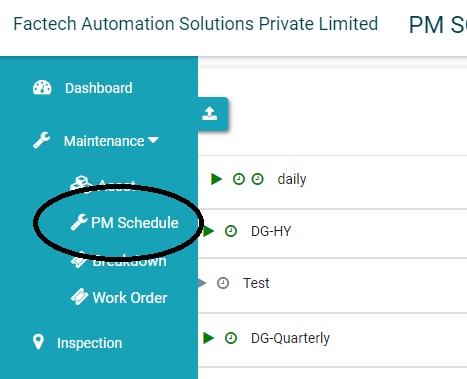
3. Open the Preventive Maintenance Schedule that you want to update. Red Time Clock means it’s deactivated.
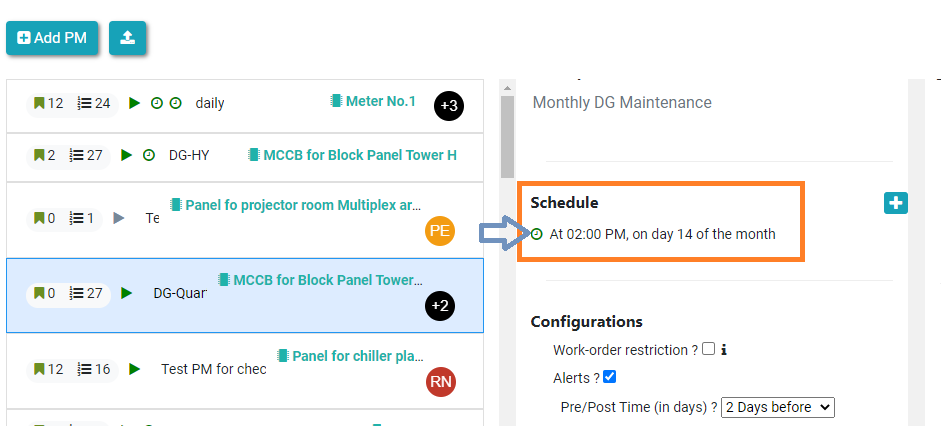
4. Click on Schedule, then you will see the toggle button to Activate or Deactivate the schedule.

Toggle button in Green means implies the schedule is Active.
After activation, work orders will be automatically get created by System as per next schedule.
Ready to Transform Your Facility Management?
See how Factech automates maintenance, assets, and compliance in one intelligent platform.
Let's Talk
Have questions about our AI-powered solutions? Our team is here to help you digitize your facility operations.
Ready to Transform Your Facility Management?
See how Factech automates maintenance, assets, and compliance in one intelligent platform.
Let's Talk
Have questions about our AI-powered solutions? Our team is here to help you digitize your facility operations.


Leave a Comment