
How to log ticket in Factech FM Software solution?
Factech has a 24 x 7 ticketing system for their users
Below are steps to log a ticket after login in Factech.
Step 1: After Admin login, Select “Log ticket” option from top right corner

Step 2: Select category, sub category, description of your query or feedback and click on “Submit” button
In case you don’t find the exact category you are looking select most relevant one and raise your query.
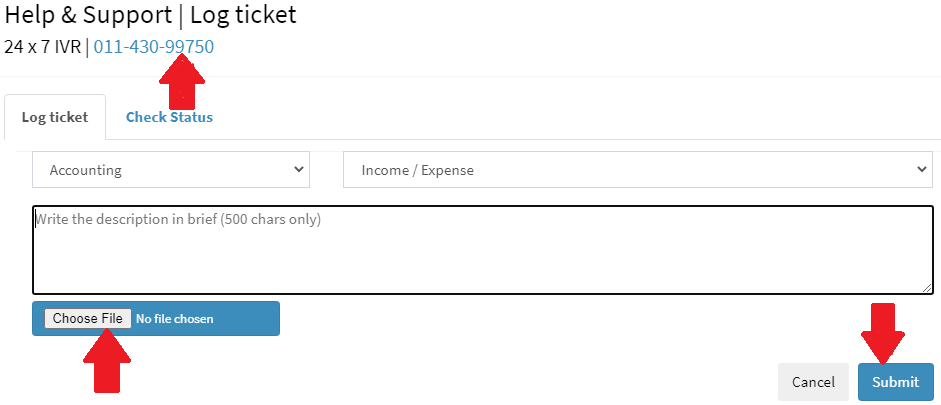
After logging a ticket, you’ll get acknowledged by ticket number on registered email.
You can change communication email and mobile as per needs.

Check open and close ticket status on click of “Check Status”
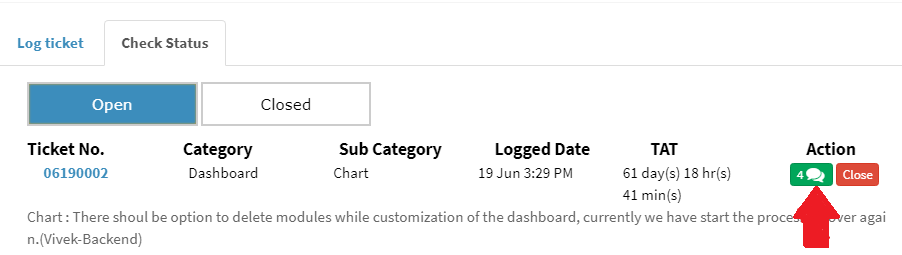
See remark and comments for any logged ticket on click of comments.
Ready to Transform Your Facility Management?
See how Factech automates maintenance, assets, and compliance in one intelligent platform.
Let's Talk
Have questions about our AI-powered solutions? Our team is here to help you digitize your facility operations.
Ready to Transform Your Facility Management?
See how Factech automates maintenance, assets, and compliance in one intelligent platform.
Let's Talk
Have questions about our AI-powered solutions? Our team is here to help you digitize your facility operations.


Leave a Comment