
How to Enable Multiple Meter?
Sometime there is a need to record meter readings from multiple meters against same unit. Specially in commercial complexes a single unit can have 2 to 10+ meters installed.
After login with a role having settings update permission, you can configure multiple meter by using the following steps:
Step1. Go to “Settings” icon on top right of home page.

Step2. Click on “Site Settings”
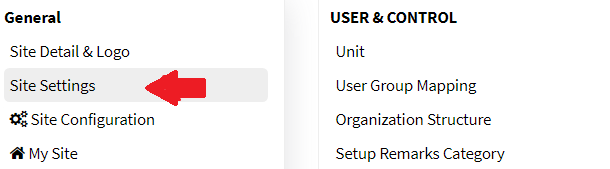
Landing on site settings, go to Billing ‘Tab” and select Enable Multiple Metering and click on Submit button.
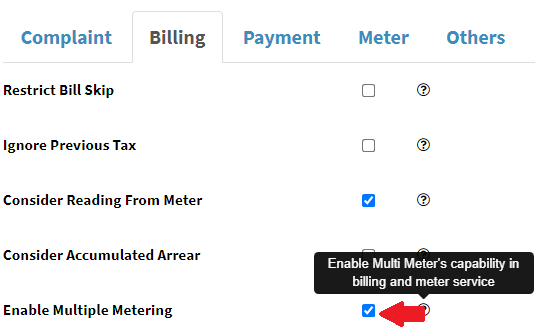
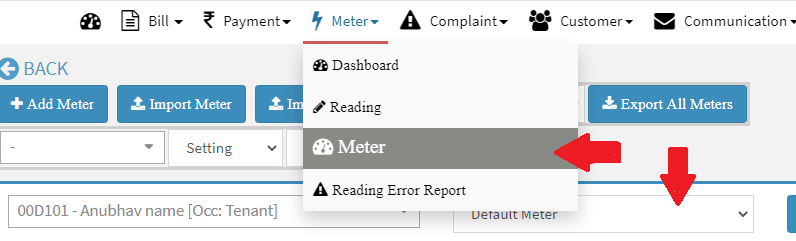
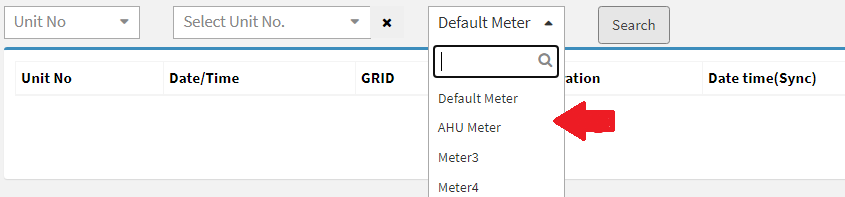
Once Multiple meter is enabled, then meter selection option will be visible in meter and reading, you can verify using following steps
Step3. Go to Main Menu (Meter), Select “Meter” option from drop down menu and
Step4. Go to Main Menu (Meter), Select “Reading” option from drop down menu
Ready to Transform Your Facility Management?
See how Factech automates maintenance, assets, and compliance in one intelligent platform.
Let's Talk
Have questions about our AI-powered solutions? Our team is here to help you digitize your facility operations.
Ready to Transform Your Facility Management?
See how Factech automates maintenance, assets, and compliance in one intelligent platform.
Let's Talk
Have questions about our AI-powered solutions? Our team is here to help you digitize your facility operations.


Leave a Comment