
How to reset or configure Payment/Debit/Credit sequence numbers in iSocietyManager
To set the Payment/Debit/Credit sequence number for the invoice in iSocietyManager/Factech, follow the steps, mentioned below:-
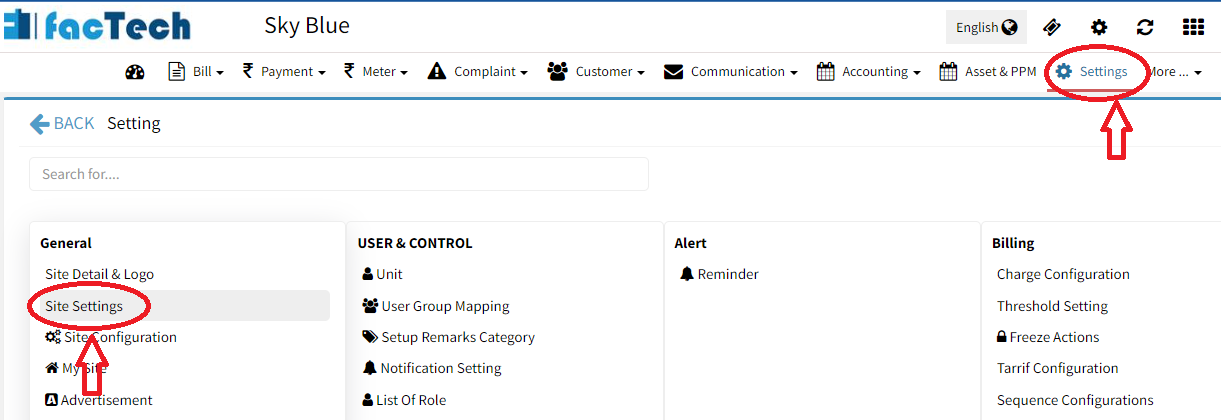
- Click on Settings > Site Settings
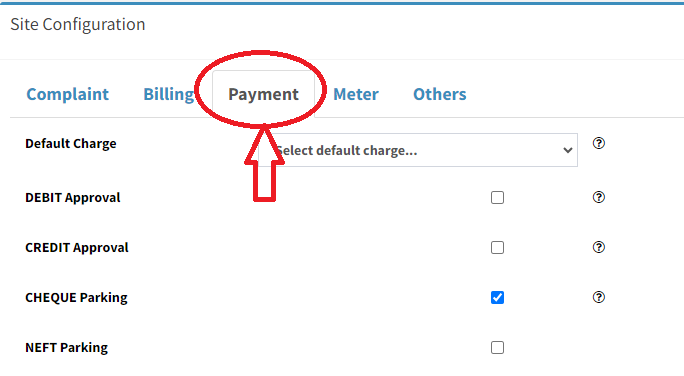
- click on “Payment” tab.
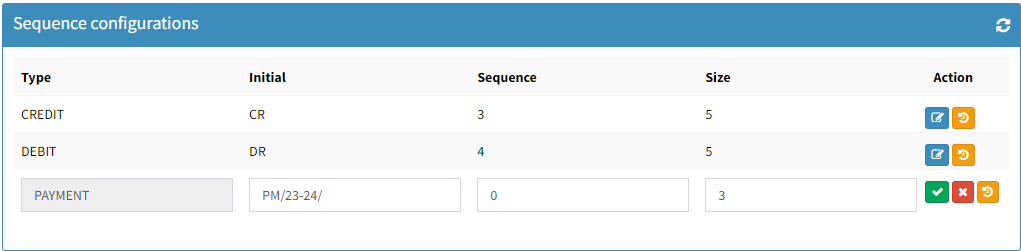
- Scroll down to change the sequence number as per requirement.
- Set Initial: Choose a fixed character for the Payment sequence (e.g., Payment you can choose PM/23-24/
- Set Sequence: If set to “0”, the Payment sequence will start from “1”.
- Define Size: Specify the number of digits for the sequence character. For example, if set to 3, it will display as 001, and the bill payment sequence number will be PM/23-24/001
Ready to Transform Your Facility Management?
See how Factech automates maintenance, assets, and compliance in one intelligent platform.
Let's Talk
Have questions about our AI-powered solutions? Our team is here to help you digitize your facility operations.
Ready to Transform Your Facility Management?
See how Factech automates maintenance, assets, and compliance in one intelligent platform.
Let's Talk
Have questions about our AI-powered solutions? Our team is here to help you digitize your facility operations.




