
How to login with multiple sites access?
Many times users can be attached to multiple sites. Especially in the case of the admin role, a user can be associated with multiple sites.
If your login id is in more than 1 site, You will see an extra combo along with a message at top
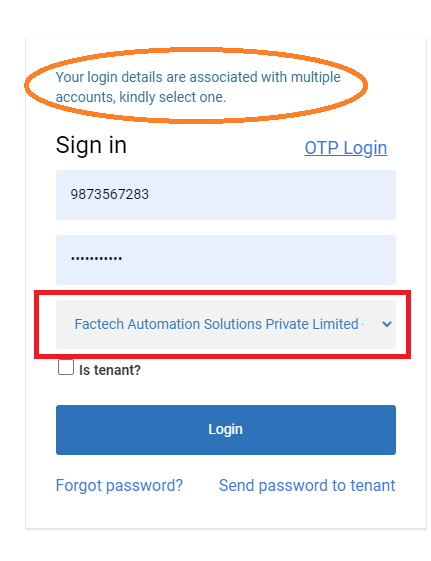
Select the site by clicking / tapping on the drop-down in which you want to login.
Notes: –
- If your password is different, you need to enter the password which is for that site
- You can get the switch option enabled, in your profile so that after login in 1 site you can switch to other one.
Ready to Transform Your Facility Management?
See how Factech automates maintenance, assets, and compliance in one intelligent platform.
Let's Talk
Have questions about our AI-powered solutions? Our team is here to help you digitize your facility operations.
Ready to Transform Your Facility Management?
See how Factech automates maintenance, assets, and compliance in one intelligent platform.
Let's Talk
Have questions about our AI-powered solutions? Our team is here to help you digitize your facility operations.


Leave a Comment