
How to Mark Attendance Using the FacTech Technician App
Mark Attendance Using the FacTech Technician App
We are happy to introduce a new functionality that allows staff members to mark their attendance directly through the FacTech Technician App.
Before marking attendance, please ensure that the required site permissions and attendance configuration have been completed. Once the configuration is in place, staff members can use the Technician App to mark their attendance.
Steps to Mark Attendance
- Open the FacTech Technician App.
- Log in using OTP with your registered mobile number.
- Navigate to Mark Attendance.
- Confirm the current date displayed on the attendance screen.
- Allow location access if prompted by the device.
- Check the location/geofence status displayed in the app.
- If you are within the configured geofence, tap Check In to mark your attendance.
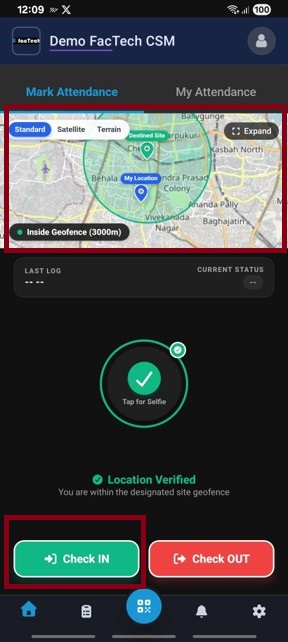

- Once your work period is completed, tap Check Out to mark your exit attendance.

View Attendance History
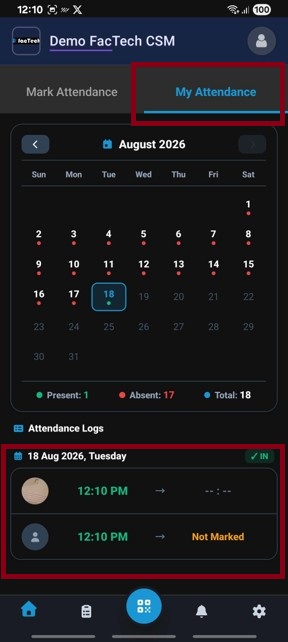
Staff members can also check their attendance records from the My Attendance section.
To view your attendance history:
- Open My Attendance under Attendance Tab.
- View your previous Check-In and Check-Out records along with the available attendance details.

Note: Attendance can only be marked when the staff member is within the configured site geofence and the required location permission is enabled.
Ready to Transform Your Facility Management?
See how Factech automates maintenance, assets, and compliance in one intelligent platform.
Let's Talk
Have questions about our AI-powered solutions? Our team is here to help you digitize your facility operations.
Ready to Transform Your Facility Management?
See how Factech automates maintenance, assets, and compliance in one intelligent platform.
Let's Talk
Have questions about our AI-powered solutions? Our team is here to help you digitize your facility operations.




