FAQ Category: customer

customer app related faq

How to update user details though excel in Factech?

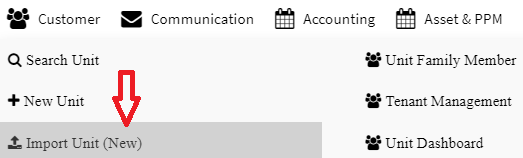
Factech have provision to update user details in bulk through any excel format and it can be mapped with system fields. Following are the steps to update user details like GSTIN, PAN, Mobile, Email, Bill start date etc. through excel. Step 1: Go to  Main Menu (Customer), Select “Import Unit (New)” option from drop down

Read more

how to export energy consumption in resident app?

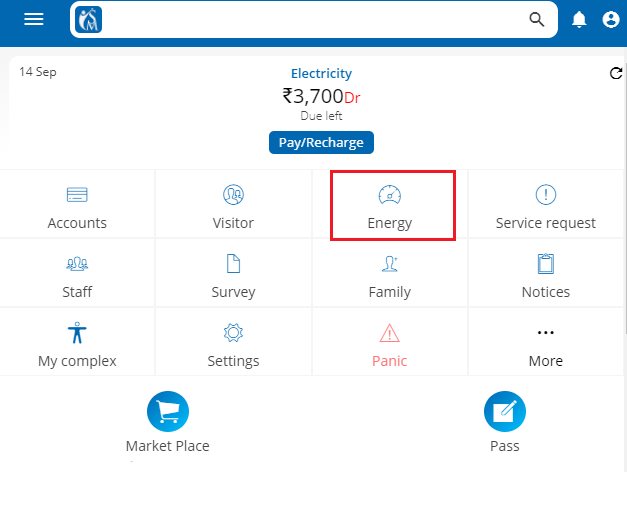
Customer can export their consumption data into excel using web version of the app. Login into web version of resident app. Select energy icon/tab on dashboard page. Click on download icon, top right corner of the screen Select date period and click on export excel button. An excel file will be downloaded into desktop/laptop. Note:

Read more

How to enable reopen complaint feature?

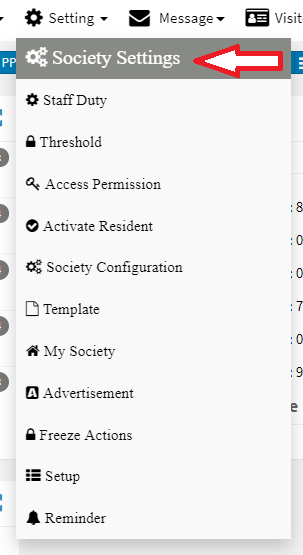
iSocietyManager has the  “Reopen”  feature in the Complaint that allow user to reopen the closed complaint. There is also an option to configure hours until when the complaint can be reopened. To enable this feature: Click on “Setting” Menu then click on “Society Settings”. Now in Complaint tab check the reopen button to enable the

Read more

Hello ! If You Are Ready To Take Your Facility Management To Next Level...