How to Change Password after login?
After login, Click on Profile image on top right Click on Profile, then on Change Password and enter your new Password
 Simplifying Facilities...
How to get started
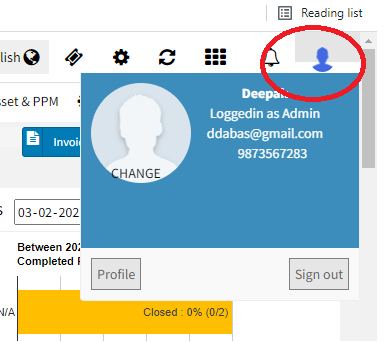
After login, Click on Profile image on top right Click on Profile, then on Change Password and enter your new Password
Self Check-In Form is the form where the visitor register themselves and get them authorized for the visit in interviews, business meetings, formal meetings etc. iSocietyManager fully equipped with lots of feature…
Residential townships usually have the concept of clusters. As per the online dictionary – a cluster is a group of similar things or people positioned or occurring closely together. Many people use…
If you want to add any new unit, follow below steps Click on User > Add New Unit Now fill the details of Unit, like Name, phone number, email address, area…
iSocietyManager has a very effective support system Online Feedback and Service Support Portal, where user can raise and track the tickets. We use iSocietyManager for managing and tracking all user’s complaints and…