
How to create document type category?
We can create the category for the different type of Document. Let’s follow the given process to create Document type category :-
- Go to More Menu, then click on Document Repository.
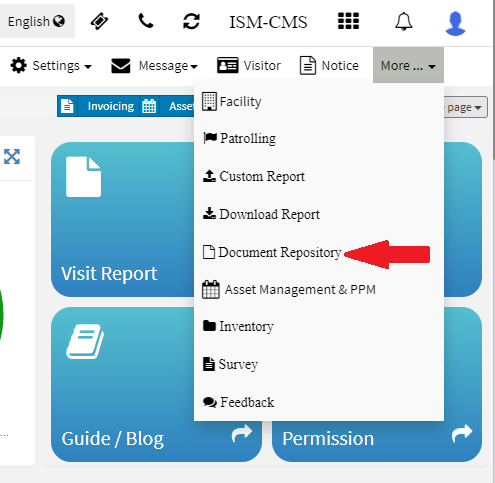
- Once you clicked on the Document Repository then a new tab will open Click on Type button to assign the category if already created then you can skip this step.

- Now provide the category name for the document type and Click on Add.
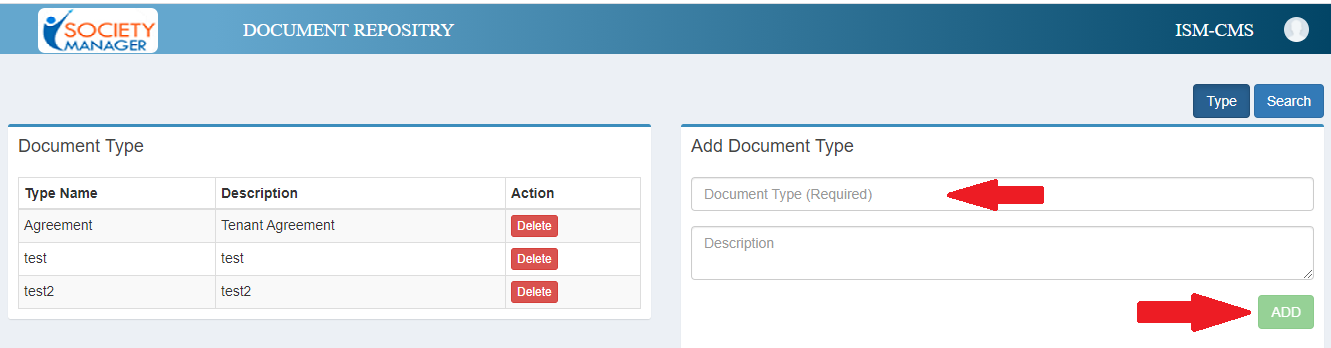
Hence this way we can create Category in Document Repository.
Ready to Transform Your Facility Management?
See how Factech automates maintenance, assets, and compliance in one intelligent platform.
Let's Talk
Have questions about our AI-powered solutions? Our team is here to help you digitize your facility operations.
Ready to Transform Your Facility Management?
See how Factech automates maintenance, assets, and compliance in one intelligent platform.
Let's Talk
Have questions about our AI-powered solutions? Our team is here to help you digitize your facility operations.


Leave a Comment