
How to configure complaint escalation?
In admin portal for the complain, we can customize the escalation matrix. iSocietyManager will automatically notify the escalated complaint with the duration for which it is customized. To configure the escalation matrix, we have to follow the given steps below :-
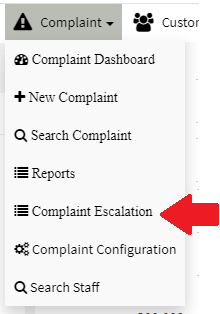
- Click on Complaint > Complaint Escalation.
- Now fill the required details like Name for the escalation, hours after which the complaint should be notified to the escalated person, email and phone numbers on which the email and SMS will be sent. Once added click on Add button

Note* Hours will be greater from the previous escalation level if already defined.
Ready to Transform Your Facility Management?
See how Factech automates maintenance, assets, and compliance in one intelligent platform.
Let's Talk
Have questions about our AI-powered solutions? Our team is here to help you digitize your facility operations.
Ready to Transform Your Facility Management?
See how Factech automates maintenance, assets, and compliance in one intelligent platform.
Let's Talk
Have questions about our AI-powered solutions? Our team is here to help you digitize your facility operations.


Leave a Comment